
SOCKS5 proxies explained: how they work and where they’re used

Picture this: you’re sitting in a café with unstable Wi-Fi, trying to stream a TV show, only to see a message saying “this content is unavailable in your region.” Or you run a parser, and it gets blocked over and over again by IP restrictions. Situations like these are frustrating—and very common. This is exactly where SOCKS5 proxies prove useful.
A SOCKS5 proxy is one of the most straightforward yet highly effective tools designed to handle problems like these.
A proxy is a server that acts as an intermediary for your internet traffic. Instead of your device connecting directly to a website or service, it connects to the proxy first. The proxy then establishes the connection to the destination and sends the responses back to you.
What SOCKS5 is
SOCKS5 is among the most flexible proxy types available. Unlike an HTTP proxy, which only works with web traffic, SOCKS5 operates at a lower network level and forwards raw connections without interpreting them. It supports both TCP and UDP, which makes it suitable for many use cases—from everyday browsing to online gaming, VoIP calls, and torrenting. SOCKS5 itself does not encrypt traffic, so when privacy or confidentiality is required, it’s commonly paired with a VPN or tunneling solution.
How a SOCKS5 proxy operates
- Your application (browser, game client, torrent software, etc.) connects to a SOCKS5 proxy using TCP (or UDP when necessary).
- All requests and data are sent through this connection to the proxy.
- The proxy hides your real IP address (and may adjust certain network parameters if needed) and opens a separate connection to the target server.
- The destination service sees the proxy as the source of the request, not your device.
- Responses from the website or service are received by the proxy and then forwarded back to your application, matched to the original requests.
Main features and benefits of SOCKS5
Wide applicability
Because SOCKS5 works at the socket level, it can forward virtually any type of network traffic—not just HTTP pages, but also game connections, torrents, VoIP calls, DNS requests, and more.
More stable connections
Since SOCKS5 focuses on forwarding TCP and UDP connections without inspecting data, it often delivers better stability for long sessions or latency-sensitive applications such as online games and video conferencing.
Flexible configuration
SOCKS5 supports authentication (for example, username and password), works with both TCP and UDP, and can be configured globally or per application. This makes it possible to route only specific programs through the proxy while leaving the rest of your traffic untouched.
Common use cases for SOCKS5 proxies
SOCKS5 proxies are commonly used:
- to change the visible IP address and improve anonymity while browsing;
- for torrenting and P2P traffic, since UDP is supported and protocols are not altered;
- in online gaming and VoIP, where stable routing and low latency are essential;
- for web scraping and automation tasks that require distributing requests across multiple IPs;
- within corporate networks for traffic control and monitoring;
- together with SSH or VPNs to build more advanced tunneling setups.
SOCKS5 compared to other proxy types
Protocol support
- SOCKS5 can forward nearly any protocol over TCP and UDP, including web traffic, torrents, games, and VoIP.
- HTTP proxies are designed specifically for HTTP/HTTPS and are not suitable for most non-web protocols without additional mechanisms.
Encryption
- SOCKS5 does not encrypt data on its own—it only forwards packets.
- HTTPS proxies usually provide TLS encryption between the client and the proxy, while HTTPS sessions between the client and the destination website remain encrypted independently.
Traffic handling
- HTTP proxies interpret HTTP requests, can modify headers, cache content, and apply filtering rules.
- SOCKS5 does not inspect or modify data—it simply passes connections through.
Compatibility and scenarios
- SOCKS5 is ideal for applications that natively support SOCKS (many desktop apps, torrent clients, and games).
- HTTP proxies are more convenient for browsers and services that rely on HTTP-specific features such as caching, filtering, or header-based authentication.
Ports and firewall traversal
- The default SOCKS port is 1080.
- HTTP proxies typically use ports like 80, 8080, or 3128, while HTTPS proxies often operate on port 443. In restrictive environments, routing traffic through HTTP/HTTPS ports can sometimes be easier, as these ports are usually open in corporate networks.
Authentication and management
- SOCKS5 supports basic authentication mechanisms such as username and password.
- HTTP proxies also support authentication and can enforce more advanced policies and logging at the HTTP level.
Configuring and testing a SOCKS5 proxy
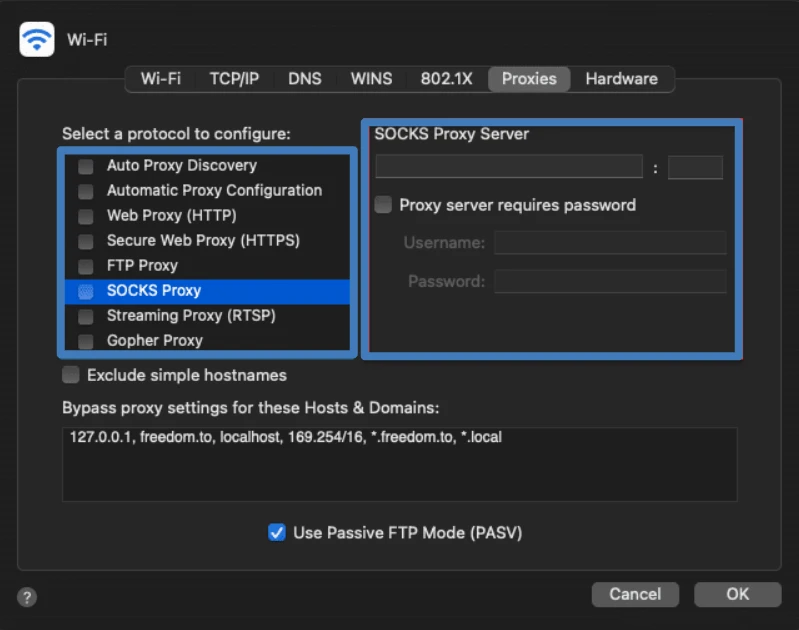
macOS
- Open System Settings and navigate to Network.
- Select the network interface you’re using (Wi-Fi or Ethernet), click Advanced, and open the Proxies tab.
- Enable SOCKS Proxy (or SOCKS5), enter the proxy address and port (commonly 1080), and provide credentials if required.
- Apply the changes and restart your browser or application so it begins using the proxy.
Windows (two approaches)
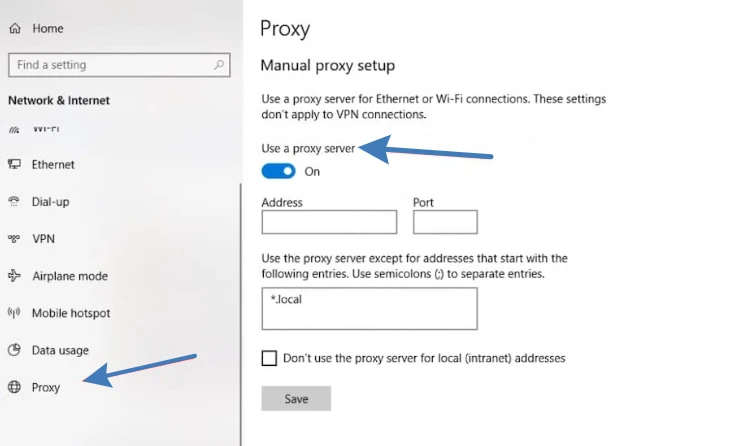
Using Settings:
- Open Settings → Network & Internet → Proxy.
- Enable manual configuration and enter the proxy address and port.
- Note: the Windows Settings interface is primarily designed for HTTP/HTTPS proxies, so this method may not work with all SOCKS-based applications.
Using Control Panel:
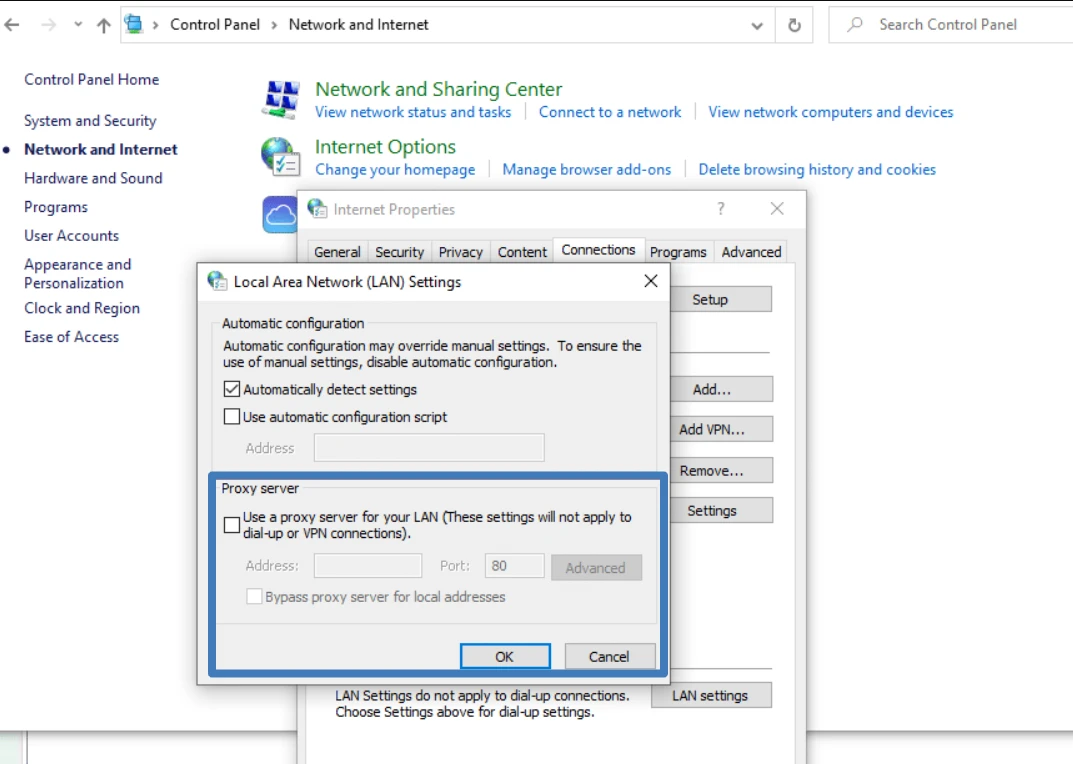
- Open Control Panel → Network and Internet → Internet Options.
- Go to the Connections tab, click LAN settings, then Advanced.
- In the Proxy Server window, locate the SOCKS field and enter the proxy IP and port, then save the settings.
- Restart applications that rely on system proxy settings so they begin using the SOCKS proxy.
Choosing the right proxy provider
Key selection criteria
- Evaluate services based on real technical performance and ease of management.
- Pay close attention to actual speed and connection stability. Real-world behavior under load matters more than advertised specifications.
- Consider available IP types (residential or datacenter), geographic coverage, and supported protocols (SOCKS5, HTTP/HTTPS), as these affect compatibility.
- Review logging and security policies: whether logs are kept, how authentication works, and whether encrypted channels are supported. Features such as IP rotation, session control, dashboards or APIs for automation, and clear documentation are also valuable.
What Belurk provides
Belurk offers reliable proxy solutions for a wide variety of use cases—from everyday browsing and scraping to P2P traffic and online gaming. The service supports multiple IP types and locations, common proxy protocols, and includes tools for monitoring and managing performance. Belurk emphasizes stable connections and responsive technical support, enabling fast setup and smooth operation. When needed, the team can help you select the most suitable proxy type for your specific goals.

